

Download Radium – Free, Lightweight Internet Radio Player for Mac
Overview & Key Features
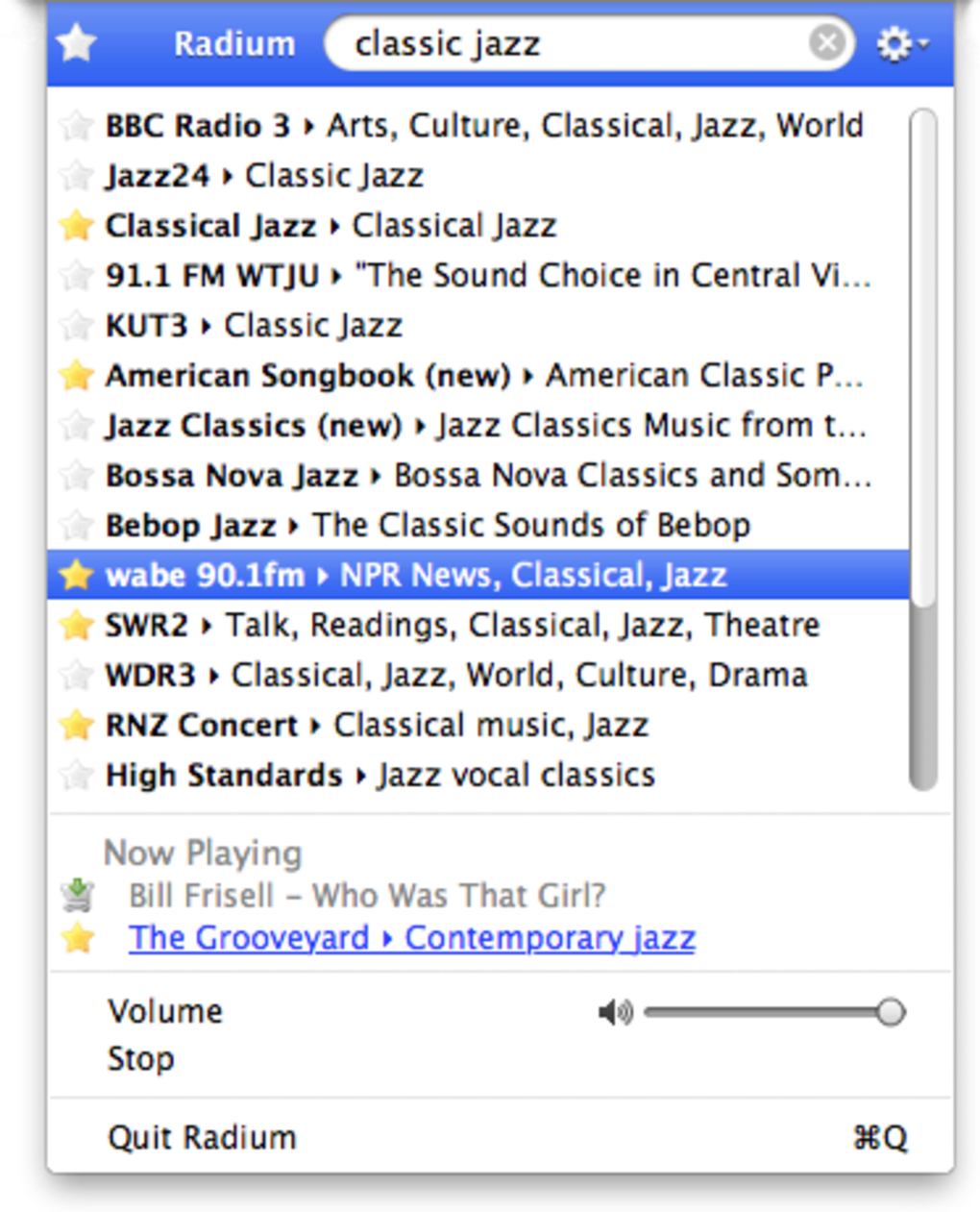
Radium is a discreet internet radio player that lives in your Mac menu bar, giving you instant access to thousands of worldwide stations without ever cluttering your desktop. Designed with simplicity and speed in mind, the app lets you type a few letters into a powerful search box and instantly see every matching station—from the familiar BBC World Service to hidden community broadcasters in dozens of languages. The search algorithm is lightning‑fast, delivering results in real time, which means you can jump from a jazz station in New Orleans to a classical channel in Vienna with just a keystroke.
Radium also supports custom streams, allowing power users to paste any HTTP or HTTPS audio URL and have it appear alongside the built‑in catalog. Sound quality is consistently high, streaming is stable, and the app’s lightweight footprint ensures it never slows down your Mac, even on older hardware. Frequent updates add new stations, polish the UI, and fix edge‑case bugs, keeping the experience fresh and reliable.
- Menu‑bar integration for one‑click access
- Instant search across a database of thousands of stations
- Support for popular broadcasters such as BBC Radio, Sky.fm, CBC
- Ability to add custom streams via URL
- High‑quality, buffer‑free streaming
- Lightweight design that uses minimal CPU and RAM
- Regular updates with new stations and bug fixes
- VoiceOver support for macOS accessibility
Installation & First‑Time Usage
Getting started with Radium is as straightforward as the app itself. Begin by visiting the official Radium website or the Mac App Store, where a single “Download” button initiates a secure, signed installer. After the download completes, double‑click the .dmg file, drag the Radium icon into your Applications folder, and launch the program. macOS may prompt you to confirm that you trust the developer; simply click “Open” to proceed. Upon first launch, Radium adds a tiny icon to the menu bar—your gateway to global radio.
The initial configuration requires no manual setup. Click the menu‑bar icon to reveal the search field; type a keyword such as “BBC” and watch as all related channels appear instantly. Select a station with a single click and the stream begins playing through your default output device. To adjust volume, use the macOS sound controls or the small volume slider that appears within the Radium dropdown. If you prefer a custom station, choose “Add Stream” from the bottom of the list, paste the stream URL, give it a friendly name, and hit “Save.” The new entry will now sit alongside the built‑in catalog, searchable just like any other station.
Radium also offers a preferences pane reachable via the gear icon. Here you can set the app to launch automatically at login, choose whether the menu‑bar icon displays a play/pause indicator, and configure keyboard shortcuts for quick station changes. These options ensure the player fits seamlessly into your workflow, whether you’re a casual listener or a radio enthusiast who switches stations multiple times per hour.
Compatibility, Performance & Pros / Cons
Radium is built exclusively for macOS, supporting versions from macOS 10.10 (Yosemite) onward, including the latest releases such as macOS Ventura and Sonoma. The app runs natively on both Intel‑based Macs and Apple Silicon (M1/M2) devices, thanks to universal binaries that automatically select the optimal architecture. System requirements are minimal: a 64‑bit processor, 100 MB of free disk space for the application bundle, and an active internet connection for streaming.
Performance-wise, Radium shines. Its lightweight codebase consumes less than 30 MB of RAM while idle and typically stays under 5 % CPU usage during playback, even on older MacBook models. The menu‑bar design means the UI never obscures other windows, and the app does not spawn background daemons that could drain battery life. Streaming stability is reinforced by automatic reconnection logic; if your network hiccups, Radium will retry the connection without interrupting playback for more than a few seconds.
Pros
- Ultra‑light footprint keeps your Mac fast and responsive.
- Instant, typo‑tolerant search across a massive station database.
- Menu‑bar access means no extra windows or clutter.
- Custom stream support lets you listen to any internet radio URL.
- Regular updates add new stations and polish the UI.
- Full macOS accessibility support, including VoiceOver.
Cons
- Currently macOS‑only; no Windows, Android, or iOS version.
- Adding custom streams lacks a detailed tutorial inside the app.
- Station metadata (song titles, artist info) is sometimes missing for obscure channels.
- No built‑in recording or podcasting features.
Frequently Asked Questions & Conclusion
Is Radium free to download and use?
Yes, Radium is completely free. You can download it from the official website or the Mac App Store without any hidden fees or subscription requirements.
Can I listen to Radium on a Windows PC?
At the moment Radium is a macOS‑only application. The developer has not announced plans for a Windows, Android, or iOS version.
How do I add my own internet radio stream?
Open Radium from the menu bar, scroll to the bottom of the station list, click “Add Stream,” paste the stream URL, give it a name, and click “Save.” The new station will appear in the searchable list.
Does Radium support high‑resolution audio?
Radium streams at the quality provided by each source. Many stations broadcast in 128 kbps or higher, and the player will deliver that audio without additional compression.
Is the app safe and secure?
Yes. Radium is signed by an Apple‑registered developer, distributed through the official website and the Mac App Store, and it does not collect personal data beyond what is needed for streaming.
In summary, Radium offers a sleek, fast, and completely free way to explore the world’s radio stations from the comfort of your Mac’s menu bar. Its intuitive search, lightweight design, and stable streaming make it a must‑have tool for anyone who enjoys discovering new music, news, or talk shows without the overhead of bulky applications. If you’re looking for a secure, hassle‑free internet radio player that stays out of your way until you need it, Radium fits the bill perfectly. Download Radium today and start tuning into global broadcasts with just a few keystrokes.







